The video you're watching,
saved as it is
Play a video and Video Catcher finds it for you. Pick a quality and press one button. Streaming video (HLS and DASH) is joined into a single file right in your browser, with nothing else to install.

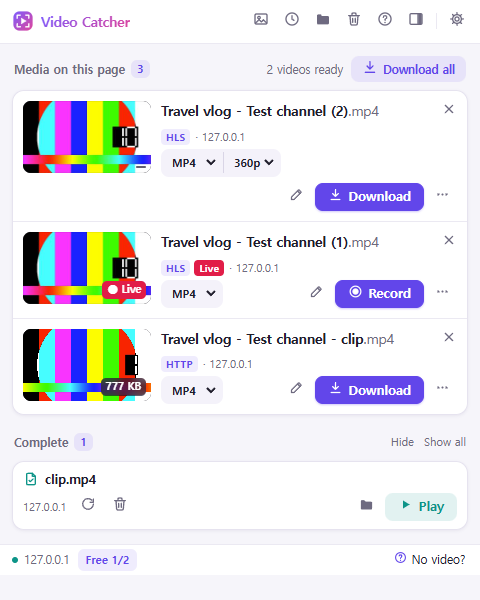
No setup. Three steps.
Once it's installed, just watch videos as usual.
Play a video
On any site, play as you normally would. The extension picks up the video files and streams the page loads.
Click the icon
The toolbar icon shows what was found on this page, with previews. Choose the quality and format.
Download
One click saves it to your Downloads folder. You can also grab several at once or keep only the audio.
Everything you need
From a plain mp4 to a stream split into hundreds of pieces, it's the same single button.
Files · HLS · DASH
Saves mp4 and webm files, and joins streaming video split into hundreds of segments into one file, right in the browser.
Pick the quality
See every quality the site offers and choose anything from the original top quality to a light low-res copy.
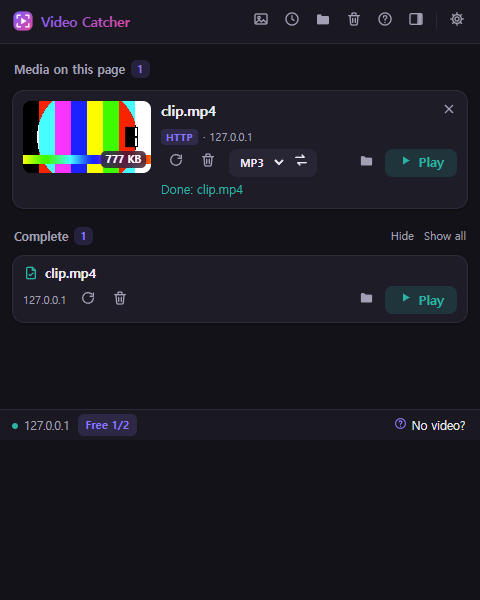
Audio only · MP3
Keep just the sound of a lecture or song as M4A. MP3 and H.264 conversion for older devices use the optional companion app.
Record live streams
Record a live broadcast and stop whenever you like. What you've received is saved as a file that plays right away.
Download all
When a page has several videos, queue them all at once. Names are kept apart automatically.
Image gallery
Collects the large images and original links on a page. Pick the ones you want and save them together.
A clean panel, wherever you like
Use it as a popup or keep it docked in the side panel. Light and dark themes are both included.
What you watch
stays with you
Video Catcher doesn't record what you watch or send it anywhere. Detection, saving and conversion all happen in your browser and on your PC.
- No account, no loginInstall and use it right away. We don't even ask for an email.
- Your history isn't sentWhat you saved and from where stays on your PC, and the history feature can be turned off.
- No ads, no trackingNothing is injected into pages and no usage habits are collected.
- One exception: Pro checksOnly when you activate Pro is the license key and a device name sent to the payment provider to verify it.
Good to know
To respect store policies and copyright, some videos are not saved.
YouTube
Under Chrome Web Store policy, YouTube videos are not listed.
DRM-protected video
Copy-protected video such as Netflix is marked "DRM" and is not saved.
Content you have no rights to
Saving or sharing video without the owner's permission is the user's responsibility. Please read the terms of use.
More videos, no waiting
Video Catcher Pro
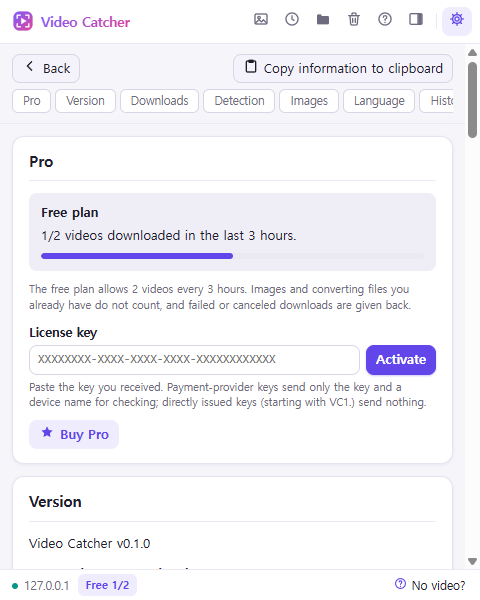
Every feature is free, and the free plan saves up to 2 videos every 3 hours. If you download a lot, Pro removes the wait.
See plans →- Unlimited video downloads
- "Download all" finishes in one go
- One license for up to 5 devices
- Lifetime license includes updates
- Priority support
Install it in your browser
The extension is all you need. Add the Windows helper app (companion) only if you want MP3 or MKV conversion.
Frequently asked questions
Is it really free?
Yes. Installing and every feature are free, with no time limit. The free plan saves up to 2 videos every 3 hours; Pro has no limit. Saving images and converting files you already have don't count.
Do I need to install anything else?
No. Streaming video (HLS and DASH) arrives in many small pieces, and the extension downloads them and joins them into one MP4 inside your browser. The optional companion app (using ffmpeg) is only needed to convert to MP3 or MKV or to re-encode.
Which sites does it work on?
Most sites that deliver video as regular files or as HLS/DASH streams. YouTube and DRM-protected video can't be saved.
Is it safe?
The extension only uses the permissions needed to download, and never downloads and runs remote code. Your browsing history and what you saved are not sent anywhere.
Can I use Pro on several devices?
One license can be activated on up to 5 of your own devices or browsers. Deactivate one in Settings to move it elsewhere.
Does it work on macOS?
Yes. Downloading and stream saving happen in the browser, so it works in Chrome on macOS and Linux too. Only the optional companion app for MP3/MKV conversion is Windows-only for now.
Still have questions? Contact us

Start with the next video you watch
One minute to install, no sign-up.